Interaction
Names selections as columns ("@focus") that the filters and channels inside it read.
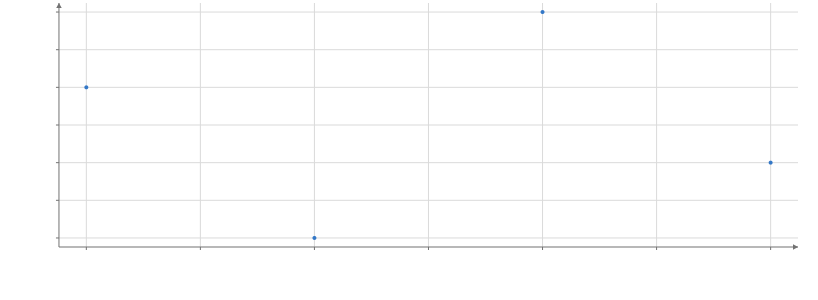
Static preview; loading the interactive plot
<script>
  import { Data, Interaction, Plot, Points, Filter, selection } from "hmplot";
  const data = { x: [1, 2, 3, 4], y: [3, 1, 4, 2] };
  // Clicked points join the selection; Interaction names it @focus, a column the Filter reads.
  const focus = selection();
</script>

<Data value={data}>
  <Interaction columns={{ "@focus": focus }}>
    <Plot height={300} axes2d>
      <Points x="x" y="y" select={focus} size={4} />
      <!-- The Interaction names the selection's column: a Filter reads it. -->
      <Filter where="@focus" inactive="none">
        <Points x="x" y="y" size={8} fill="#e0245e" />
      </Filter>
    </Plot>
  </Interaction>
</Data>
Usage
columns maps virtual field names to selection resources. Each name starts with @ and is not a state name ("@focus"); inside the Interaction it reads like @selected: 1 on the selection’s rows, 0 elsewhere. Filter reads it as where="@focus", and expressions and channels as the string "@focus" (where("@focus", 16, 8)). A selection stores membership, not copies of plotting arrays.
Virtual columns
Every Data scope also provides these columns without Interaction. @selected, @brushed, @hovered, @nearby, @nearest, and @tooltip are 1 on member rows. @any_selected, @any_brushed, @any_hovered, @any_nearby, @any_nearest, and @any_tooltip are 1 on every row while the matching column has any member, so where("@any_selected", where("@selected", 1, 0.2), 1) dims unselected rows only while something is selected. Expressions, Filter, and channels read them.
@brush_min:<column> and @brush_max:<column> report the lower and upper bounds of that column’s brush, repeated on every row. For example, subtract("@brush_max:weight", "@brush_min:weight") reads the brushed width; Python also accepts hm.col("@brush_max:weight") - hm.col("@brush_min:weight"). Bounds update during dragging and remain available when the brush contains no observations. They are data coordinates, including on inverted or log axes, and follow column identities through aliases and linked views. Datetime bounds carry the source column’s datetime metadata and use its numeric representation (milliseconds from its origin).
An unconstrained column, cleared brush, category brush, or selection set by row number returns NaN. A missing source column is an error. Other @ names must be columns an Interaction around the reader names, or produce an error that lists the available names.
Nearby
A point mark with nearby marks every row within a radius of the pointer as a preview, like hover, including overplotted rows that picking cannot reach. nearby alone is a 24 px circle; {radius, units, axis} adjusts it. axis: "x" or "y" tests one dimension, so nearby={{axis: "x", units: "data", radius: 0.5}} picks the observations at the pointer’s time in a time series. A units: "data" radius is measured after the axis transform: in data units on a linear axis, and on a log axis radius r reaches a factor of e^r either side of the pointer. A pixel radius belongs to the view under the pointer: it stays a preview and is never committed or sent to Python.
By default a mark fades its other rows while something is nearby (respond, selectionOpacity); inside Facet cells each cell matches only its own rows. Leaving the plot or pressing Escape clears it.
See the complete example.
Nearest
A mark with nearest marks the row its tooltip would show as @nearest, with or without a tooltip: the row under the pointer, else the nearest drawn row of the mark within radius CSS pixels (nearest={{radius: 24}}; the default is the tooltip’s radius, else 16). Hover is only the row exactly under the pointer, and nearby every row within a radius in data space; nearest is one drawn row, found in a small window of the pick buffer, in any view (3D, polar and maps too), and a covered row is never found. Line, Area mark a whole series. A mark with a tooltip marks its row so, and a Plot’s nearest is its marks’ default. Like hover it fades nothing until respond="nearest" asks; leaving the plot clears it.