Data Analytics and Visualization

1-0: Analyzing a Single Variable

Prof. Gabe Hope

Narrowing our focus

So far: DataFrames

What can we do with just one of these columns?

Name Miles_per_Gallon Cylinders Displacement Horsepower Weight_in_lbs Acceleration Year Origin
0 chevrolet chevelle malibu 18.0 8 307.0 130.0 3504 12.0 1970-01-01 USA
1 buick skylark 320 15.0 8 350.0 165.0 3693 11.5 1970-01-01 USA
2 plymouth satellite 18.0 8 318.0 150.0 3436 11.0 1970-01-01 USA
3 amc rebel sst 16.0 8 304.0 150.0 3433 12.0 1970-01-01 USA
4 ford torino 17.0 8 302.0 140.0 3449 10.5 1970-01-01 USA
... ... ... ... ... ... ... ... ... ...
401 ford mustang gl 27.0 4 140.0 86.0 2790 15.6 1982-01-01 USA
402 vw pickup 44.0 4 97.0 52.0 2130 24.6 1982-01-01 Europe
403 dodge rampage 32.0 4 135.0 84.0 2295 11.6 1982-01-01 USA
404 ford ranger 28.0 4 120.0 79.0 2625 18.6 1982-01-01 USA
405 chevy s-10 31.0 4 119.0 82.0 2720 19.4 1982-01-01 USA

406 rows × 9 columns

Recall: 3 variable types

  • Nomial
  • Ordinal
  • Quantitative
Name Miles_per_Gallon Cylinders Displacement Horsepower Weight_in_lbs Acceleration Year Origin
0 chevrolet chevelle malibu 18.0 8 307.0 130.0 3504 12.0 1970-01-01 USA
1 buick skylark 320 15.0 8 350.0 165.0 3693 11.5 1970-01-01 USA
2 plymouth satellite 18.0 8 318.0 150.0 3436 11.0 1970-01-01 USA
3 amc rebel sst 16.0 8 304.0 150.0 3433 12.0 1970-01-01 USA
4 ford torino 17.0 8 302.0 140.0 3449 10.5 1970-01-01 USA
5 ford galaxie 500 15.0 8 429.0 198.0 4341 10.0 1970-01-01 USA
6 chevrolet impala 14.0 8 454.0 220.0 4354 9.0 1970-01-01 USA
7 plymouth fury iii 14.0 8 440.0 215.0 4312 8.5 1970-01-01 USA
8 pontiac catalina 14.0 8 455.0 225.0 4425 10.0 1970-01-01 USA
9 amc ambassador dpl 15.0 8 390.0 190.0 3850 8.5 1970-01-01 USA
10 citroen ds-21 pallas NaN 4 133.0 115.0 3090 17.5 1970-01-01 Europe
11 chevrolet chevelle concours (sw) NaN 8 350.0 165.0 4142 11.5 1970-01-01 USA
12 ford torino (sw) NaN 8 351.0 153.0 4034 11.0 1970-01-01 USA
13 plymouth satellite (sw) NaN 8 383.0 175.0 4166 10.5 1970-01-01 USA
14 amc rebel sst (sw) NaN 8 360.0 175.0 3850 11.0 1970-01-01 USA

Nominal variables

Recall: 3 variable types

  • Nomial
  • Ordinal
  • Quantitative
origin_data = cars[['Origin']]
origin_data
Origin
0 USA
1 USA
2 USA
3 USA
4 USA
... ...
401 USA
402 Europe
403 USA
404 USA
405 USA

406 rows × 1 columns

Analyzing a single nominal variable

Origin
0 USA
1 USA
2 USA
3 USA
4 USA
5 USA
6 USA
7 USA
8 USA
9 USA
10 Europe
11 USA
12 USA
13 USA
14 USA
15 USA
16 USA
17 USA
18 USA
19 USA

What questions could we ask about this data?

What values does our variable take?

Assuming it’s a categorical variable with a finite set of possible values.

Origin
0 USA
1 USA
2 USA
3 USA
4 USA
5 USA
6 USA
7 USA
8 USA
9 USA
10 Europe
11 USA
12 USA
13 USA
14 USA
15 USA
16 USA
17 USA
18 USA
19 USA

In Pandas, get the unique values in a series object with unique()

origin_series = origin_data['Origin']
origin_series.unique() 
array(['USA', 'Europe', 'Japan'], dtype=object)

Explicitly set the type of the column to category

origin_data['Origin'] = origin_data['Origin'].astype('category')
origin_data['Origin'] # View the column
0         USA
1         USA
2         USA
3         USA
4         USA
        ...  
401       USA
402    Europe
403       USA
404       USA
405       USA
Name: Origin, Length: 406, dtype: category
Categories (3, object): ['Europe', 'Japan', 'USA']

:::::

What about visualization?

We only have 1 variable to encode…

ggplot() + geom_point(
    data=origin_data,
    mapping=aes(x='Origin'),
)

Not helpful

ggplot() + geom_point(
    data=origin_data,
    mapping=aes(color='Origin'),
)

Very not helpful

How many times does each value occur?

We need to count them!

counts = origin_data.value_counts()
counts
Origin
USA       254
Japan      79
Europe     73
Name: count, dtype: int64

This gives a series, we can convert back to a DataFrame with:

counts = counts.reset_index()
counts
Origin count
0 USA 254
1 Japan 79
2 Europe 73

Now we can plot Origin vs. count!

ggplot() + geom_point(
    data=counts,
    mapping=aes(x='Origin', y='count'),
) + scale_y_continuous(limits=[0, None])

Computing statistics

A count is our first example of a statistic: a value of interest computed from our data!

# Our original data
origin_data.head()
Origin
0 USA
1 USA
2 USA
3 USA
4 USA
counts = origin_data.value_counts().reset_index()
counts
Origin count
0 USA 254
1 Japan 79
2 Europe 73

Here we transformed our data, representing it in terms of its count statistics

Components of our Grammar of Graphics

This is one of the missing pieces of our visualization grammar!

  • Data
  • Aesthetic mappings
  • Geometries
  • (Statistical) Transforms
  • Scales
  • Coordinate systems
  • Faceting systems
  • Annotations

stat in ggplot/lets-plot

Statistical transforms are built-in to ggplot, through the stat option!

New

ggplot() + geom_point(
    data=origin_data, stat='count',
    mapping=aes(x='Origin', y='..count..'),
) + scale_y_continuous(limits=[0, None])

Computed statistics are given names of the form ..stat..

Old

ggplot() + geom_point(
    data=counts,
    mapping=aes(x='Origin', y='count'),
) + scale_y_continuous(limits=[0, None])

Bar plots

Bar geometries use the count stat by default.

ggplot() + geom_bar(
    data=origin_data,
    mapping=aes(x='Origin'),
)
ggplot() + geom_bar(
    data=counts, stat='identity',
    mapping=aes(x='Origin', y='count'),
) + scale_y_continuous(limits=[0, None])

Specify stat='identity' to avoid the count transform

Bar plots

Specifying the fill mapping creates a stacked bar plot showing proportions of a whole.

ggplot() + geom_bar(
    data=origin_data,
    mapping=aes(x='Origin'),
)
ggplot() + geom_bar(
    data=origin_data,
    mapping=aes(fill='Origin'),
)

Pie & donut charts

Pie & donut charts work similarly

ggplot() + geom_bar(
    data=origin_data,
    mapping=aes(fill='Origin'),
)
ggplot() + geom_pie(
    data=origin_data, size=25, hole=0.3,
    mapping=aes(fill='Origin'),
)

size specifies the radius of the pie, hole the fraction of the center removed.

Ordering

NYC subway rides for July 2024, by station

station_complex count
417 1 Av (L) 486589
237 103 St (1) 214574
331 103 St (6) 175700
65 103 St (C,B) 90182
299 103 St-Corona Plaza (7) 481987
... ... ...
267 Woodhaven Blvd (J,Z) 27981
13 Woodhaven Blvd (M,R) 338726
425 Woodlawn (4) 106450
253 York St (F) 301072
389 Zerega Av (6) 37238

428 rows × 2 columns

Ordering

How to order all 428 stations?

ggplot() + geom_bar(
    data=rides,
    mapping=aes(x='station_complex', y='count'),
    stat='identity', width=1,
) + scale_x_discrete(lablim=12) + ggsize(3000, 400)

Do we even want to see that many?

Ordering

Order by count!

sorted_rides = rides.sort_values('count', ascending=False) 

ggplot() + geom_bar(
    data=sorted_rides.head(25), # Take first 20 rows
    mapping=aes(x='station_complex', y='count'),
    stat='identity', width=1,
) + scale_x_discrete(lablim=12) + ggsize(1000, 400)

Another statistic: mode

The mode is the most frequent value in a dataset

Computing in Pandas:

rides.sort_values('count', ascending=False).head(1)
station_complex count
62 Times Sq-42 St (N,Q,R,W,S,1,2,3,7)/42 St (A,C,E) 3794860

Ordinal Variables

Recall: 3 variable types

  • Nomial
  • Ordinal
  • Quantitative
cyl_data = cars[['Cylinders']]
cyl_data.head(5)
Cylinders
0 8
1 8
2 8
3 8
4 8

Creating an ordinal type

cylinder_type = pd.CategoricalDtype([3, 4, 5, 6, 8], ordered=True)
cyl_data['Cylinders'] = cyl_data['Cylinders'].astype(cylinder_type)
cyl_data.head(5)
Cylinders
0 8
1 8
2 8
3 8
4 8

Ordinal variables

Maintain the correct order!

ggplot() + geom_bar(
    data=cyl_data,
    mapping=aes(x='Cylinders')
)
ggplot() + geom_bar(
    data=cars,
    mapping=aes(x='Cylinders')
) + scale_x_discrete()

Quantitative Variables

Recall: 3 variable types

  • Nomial
  • Ordinal
  • Quantitative
weight_data = cars[['Weight_in_lbs']]
weight_data
Weight_in_lbs
0 3504
1 3693
2 3436
3 3433
4 3449
... ...
401 2790
402 2130
403 2295
404 2625
405 2720

406 rows × 1 columns

Analyzing a single quantitative variable

Weight_in_lbs
0 3504
1 3693
2 3436
3 3433
4 3449
5 4341
6 4354
7 4312
8 4425
9 3850
10 3090
11 4142
12 4034
13 4166
14 3850
15 3563
16 3609
17 3353
18 3761
19 3086

What questions could we ask about this data?

Visualizing a single quantitative variable

ggplot() + geom_point(
    data=weight_data, 
    mapping=aes(x='Weight_in_lbs')
) + ggsize(1000, 200)

Visualizing a single quantitative variable

Using a different shape

ggplot() + geom_point(
    data=weight_data, shape=3,
    mapping=aes(x='Weight_in_lbs')
) + ggsize(1000, 200)

Rule plots

ggplot() + geom_vline(
    data=weight_data, 
    mapping=aes(xintercept='Weight_in_lbs')
) + ggsize(1000, 200)

Using a different thickness

ggplot() + geom_vline(
    data=weight_data, size=0.1,
    mapping=aes(xintercept='Weight_in_lbs')
) + ggsize(1000, 200)

Visualizing a single quantitative variable

Using a different alpha (opacity)

ggplot() + geom_point(
    data=weight_data, size=5, alpha=0.1, 
    mapping=aes(x='Weight_in_lbs')
) + ggsize(1000, 200)

Visualizing a single quantitative variable

Why not use the y-axis?

Set it to something random…

jittered_weights = pd.DataFrame(dict(
    Weight_in_lbs = weight_data['Weight_in_lbs'],
    jitter = np.random.random(len(weight_data))))

ggplot() + geom_point(
    data=jittered_weights, 
    mapping=aes(x='Weight_in_lbs', y='jitter')
) + ggsize(1000, 200)

Jitter plots

Tell ggplot what to do when points overlap with position

ggplot() + geom_point(
    data=weight_data, position='jitter',
    mapping=aes(x='Weight_in_lbs')) + ggsize(1000, 150)

Or use geom_jitter

ggplot() + geom_jitter(
    data=weight_data,
    mapping=aes(x='Weight_in_lbs')) + ggsize(1000, 150)

Opinions?

Dot plots

ggplot() + geom_dotplot(
    data=weight_data, 
    mapping=aes(x='Weight_in_lbs'), 
    stackratio=1., binwidth=50, fill='black',
) + ggsize(1000, 300)

We’ve seen this before!

Dot plots

Histogram transform (bin transform)

counts, edges = np.histogram(weight_data['Weight_in_lbs'], bins=75)
ggplot() + geom_histogram(
    data=weight_data, 
    mapping=aes(x='Weight_in_lbs'), bins=75) + ggsize(1000, 300)

Number of bins

counts, edges = np.histogram(weight_data['Weight_in_lbs'], bins=10)
ggplot() + geom_histogram(
    data=weight_data, 
    mapping=aes(x='Weight_in_lbs'), bins=10) + ggsize(1000, 300)

Number of bins

An aside: cumulative histograms

Histogram transform (bin transform)

What questions are easy to answer with a histogram? What questions are hard?

How could we make them easier?

Cumulative histograms

counts, edges = np.histogram(weight_data['Weight_in_lbs'], bins=10)
centers = (edges[1:] + edges[:-1]) / 2.
ccounts = np.cumsum(counts)

hist = pd.DataFrame(dict(centers=centers, 
    edges=edges[1:], ccounts=ccounts))

ggplot() + geom_bar(
    data=hist, 
    mapping=aes(x='centers', y='ccounts'), 
    stat='identity', width=1)  + ggsize(500, 300)

Cumulative histograms

The height difference between 2 bars tells us the number of observations between them.

Cumulative histograms: bins

Cumulative histograms are less sensitive to the number of bins. Why?

Cumulative histograms: bins

Taken to the extreme: one bin for every observation.

counts, edges = np.histogram(weight_data['Weight_in_lbs'], bins=1000)

centers = (edges[1:] + edges[:-1]) / 2.
ccounts = np.cumsum(counts)

hist = pd.DataFrame(dict(centers=centers, edges=edges[1:], ccount=ccounts))
ggplot() + geom_line(
    data=hist, 
    mapping=aes(x='centers', y='ccount'), 
    stat='identity',) + ylab('Cumulative count') + ggsize(1000, 300)

Empirical CDF Plot

If we divide by the total number of observations we get the fraction of data up to a point.

ggplot() + stat_ecdf(
    data=weight_data, 
    mapping=aes(x='Weight_in_lbs')
) + scale_y_continuous(breaks=[0, .25, .5, .75, 1.]) + ylab('Quantile')

Empirical CDF Plot

If we divide by the total number of observations we get the fraction of data up to a point.

This is an empirical CDF plot (percentile/quantile plot)

An x percentile is the observation that x% of observations are less than.

ggplot() + stat_ecdf(
    data=weight_data, 
    mapping=aes(x='Weight_in_lbs')
) + scale_y_continuous(breaks=[0, .25, .5, .75, 1.]) + ylab('Quantile')

Statistics: median

Percentiles define various useful summary statistics

The median is the point such that 50% of observations are smaller.

In Pandas:

weight_data['Weight_in_lbs'].median()
np.float64(2822.5)
ggplot()  + stat_ecdf(
    data=weight_data, 
    mapping=aes(x='Weight_in_lbs')
) + scale_y_continuous(breaks=[0, .25, .5, .75, 1.]) + ylab('Quantile')

Statistics: min/max

Percentiles define various useful summary statistics

The min/max are self-explanatory, but are also the 0% and 100% percentiles of the data.

In Pandas:

weight_data['Weight_in_lbs'].min()
np.int64(1613)
ggplot()  + stat_ecdf(
    data=weight_data, 
    mapping=aes(x='Weight_in_lbs')
) + scale_y_continuous(breaks=[0, .25, .5, .75, 1.]) + ylab('Quantile')

Statistics: quartiles

Percentiles define various useful summary statistics

The quartiles are the 25%, 50% (median) and 75% percentiles of the data.

In Pandas:

weight_data['Weight_in_lbs'].quantile(0.25)
np.float64(2226.5)
ggplot() + stat_ecdf(
    data=weight_data, 
    mapping=aes(x='Weight_in_lbs')
) + scale_y_continuous(breaks=[0, .25, .5, .75, 1.]) + ylab('Quantile')

Box-and-Whisker plots

Common to visualize just these statistics.

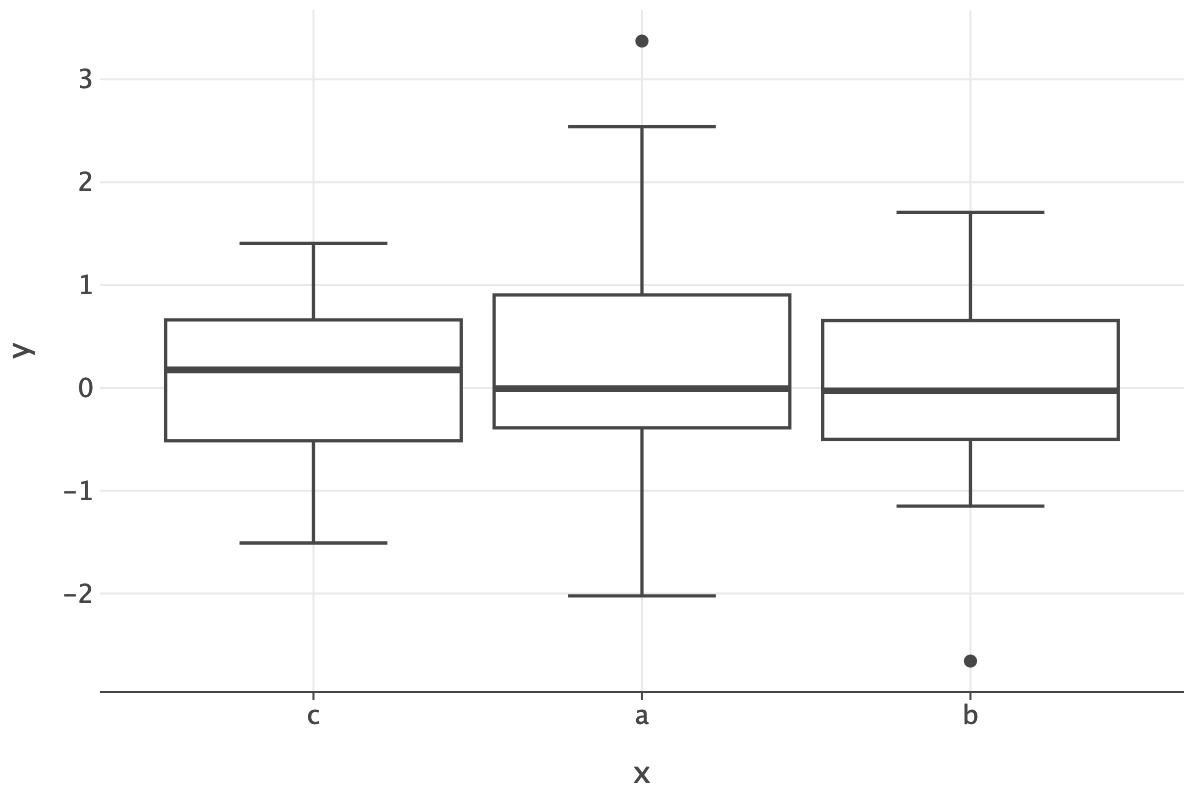
This is called a box-and-whisker plot, which plots 5 statistics of the data. Typically:

  • Min & max
  • Median
  • 25% and 75% percentiles
ggplot() + geom_boxplot(
    data=weight_data, 
    mapping=aes(x='Weight_in_lbs'), orientation='y'
) + scale_y_continuous(limits=[-1.5, 1.5]) 

Box-and-Whisker plots

Common to visualize just these statistics.

This is called a box-and-whisker plot, which plots 5 statistics of the data. Typically:

  • Min & max
  • Median
  • 25% and 75% percentiles
ggplot() + geom_boxplot(
    data=weight_data, 
    mapping=aes(x='Weight_in_lbs'), orientation='y'
) + scale_y_continuous(limits=[-1.5, 1.5]) 

Box-and-Whisker plots

Whiskers often limited by inter-quartile range (IQR)

The IQR is the distance from the 25% to 75% points.

  • Commonly limit whisker distance from median to 1.5 * IQR.
  • Further observations shown as points

Box-and-Whisker plots

Position by origin

ggplot() + geom_boxplot(
    data=cars, 
    mapping=aes(y='Weight_in_lbs', x='Origin'), 
    orientation='x'
)

Scale box width by number of observations

ggplot() + geom_boxplot(
    data=cars, varwidth=True,
    mapping=aes(y='Weight_in_lbs', x='Origin'), 
    orientation='x'
)

Returning to number of bins

Number of bins

Some notation:

  • Sampled dataset of N (scalar) observations: \{ x_1, ... , x_N \}.
  • Divided into K bins \{ b_1, ... , b_K \}, with equal width h.
  • Let c_k be the number of observations in bin k.

Number of bins

The proportion (p_k) of observations assigned to bin k is:

p_k = \frac{c_k}{N}

Note that: p_k \geq 0, \quad \sum_{1}^{K} p_k = 1

Therefore \{p_1,...,p_K\} form a probability mass function (PMF) over bins.

ggplot() + geom_histogram(
    data=weight_data, stat='bin',
    mapping=aes(x='Weight_in_lbs', y='..count..'), 
    bins=75) + ggsize(400, 200)
ggplot() + geom_histogram(
    data=weight_data, stat='bin',
    mapping=aes(x='Weight_in_lbs', y='..density..'), 
    bins=75) + ggsize(400, 200)

Number of bins

Our underlying data is continuous not discrete, can we estimate a probability density function (\hat{p}(x)) instead?

Let the value of b_k be the left edge of bin k (so b_k + h = b_{k+1}).

Number of bins

The integral of the density function over a bin should equal the bin’s proportion. \int_{b_k}^{b_k+h} \hat{p}(x) dx = p_k = \frac{c_k}{N}

Therefore our density function should be: \hat{p}(x)= \frac{p_k}{h}=\frac{c_k}{N\cdot h} \text{for } x \in [b_k, b_k+h)

\hat{p}(x)= 0, \quad \text{for } x \notin [b_1, b_K+h)

Number of bins

Assume our data comes from a plausible reference distribution (p(x)) e.g.

p(x) = \frac{1}{\sigma \sqrt{2 \pi}} \exp\left(-\frac{(x - \mu)^2}{2 \sigma^2} \right)

Where we can estimate the parameters using the sample mean and sample standard deviation:

\mu = \bar{x}, \quad \sigma = s

Estimated normal distribution

Number of bins

Compare our histogram estimated pdf, \hat{p}(x), to our reference pdf p(x).

Squared error at x: SE = (p(x) - \hat{p}(x))^2

Integrated squared error:

ISE = \int_{-\infty}^{\infty} (p(x) - \hat{p}(x))^2 dx

Estimated distributions

\hat{p}(x)= \frac{p_k}{h}=\frac{c_k}{N\cdot h}, \quad \text{for } x \in [b_k, b_k+h)

Number of bins

Compare our histogram estimated pdf, \hat{p}(x), to our reference pdf p(x).

Mean integrated squared error:

MISE = E\left[ \int (p(x) - \hat{p}(x))^2 dx \right]

Expectation over samples of N observations from our reference distribution

Estimated distributions

\hat{p}(x)= \frac{p_k}{h}=\frac{c_k}{N\cdot h}, \quad \text{for } x \in [b_k, b_k+h)

Number of bins

Scott’s rule: Optimal bin width (h) by minimizing MISE:

h^* = \underset{h}{\text{argmin}} MISE \approx 3.5 s \cdot N^{-\frac{1}{3}}

The Freedman-Diaconis rull replaces the sample standard deviation (s) with the interquartile range (IQR).

h^* = 2 IQR\cdot N^{-\frac{1}{3}}

More robust to outliers

Kernel density plots

Histogram sensitivity

Bars at observations

One observation

ggplot(
    data=weight_data[:1], 
    mapping=aes(x='Weight_in_lbs')) + \
    geom_density(kernel='rectangular', bw=50) + \
    geom_point(size=10)  + scale_x_continuous(limits=[3000, 4000])

Two observations

ggplot(
    data=weight_data[:2], 
    mapping=aes(x='Weight_in_lbs')) + \
    geom_density(kernel='rectangular', bw=50) + \
    geom_point(size=10)  + scale_x_continuous(limits=[3000, 4000])

Bars at observations

One observation

ggplot(
    data=weight_data[:1], 
    mapping=aes(x='Weight_in_lbs')) + \
    geom_density(kernel='rectangular', bw=50) + \
    geom_point(size=10)  + scale_x_continuous(limits=[3000, 4000])

Indicator function I(\text{predicate}) = \begin{cases} 1 \text{ if predicate is true} \\ 0 \text{ otherwise} \\ \end{cases}

Our function: \hat{p}(x) = \frac{1}{2h} I\left(\frac{|x - x_1|}{h} \leq 1\right)

h is the width of the bar or bandwidth

Bars at observations

Add bars where they overlap!

Two observations

ggplot(
    data=weight_data[:2], 
    mapping=aes(x='Weight_in_lbs')) + \
    geom_density(kernel='rectangular', bw=50) + \
    geom_point(size=10)  + scale_x_continuous(limits=[3000, 4000])

Three observations

ggplot(
    data=weight_data[:3], 
    mapping=aes(x='Weight_in_lbs')) + \
    geom_density(kernel='rectangular', bw=50) + \
    geom_point(size=10)  + scale_x_continuous(limits=[3000, 4000])

Bars at observations

Add bars where they overlap!

Three observations

ggplot(
    data=weight_data[:3], 
    mapping=aes(x='Weight_in_lbs')) + \
    geom_density(kernel='rectangular', bw=50) + \
    geom_point(size=10)  + scale_x_continuous(limits=[3000, 4000])

Five observations

ggplot(
    data=weight_data[:5], 
    mapping=aes(x='Weight_in_lbs')) + \
    geom_density(kernel='rectangular', bw=50) + \
    geom_point(size=10)  + scale_x_continuous(limits=[3000, 4000])

Bars at observations

All observations

ggplot(
    data=weight_data, 
    mapping=aes(x='Weight_in_lbs')) + \
    geom_density(kernel='rectangular', bw=50) + \
    geom_point(size=10)  + scale_x_continuous(limits=[3000, 4000])\
        + ggsize(1000, 400)

With N observations:

\hat{p}(x) = \frac{1}{2Nh} \sum_{i=1}^N I\left(\frac{|x - x_i|}{h} \leq 1\right)

Bars at observations

Varying the bar width

Three observations

ggplot(
    data=weight_data, 
    mapping=aes(x='Weight_in_lbs')) + \
    geom_density(kernel='rectangular', bw=20) + \
    geom_point(size=10)  + scale_x_continuous(limits=[3000, 4000])

Five observations

ggplot(
    data=weight_data, 
    mapping=aes(x='Weight_in_lbs')) + \
    geom_density(kernel='rectangular', bw=200) + \
    geom_point(size=10)  + scale_x_continuous(limits=[3000, 4000])

Bars at observations

Sharp drop-off not ideal.

ggplot(
    data=weight_data[:1], 
    mapping=aes(x='Weight_in_lbs')) + \
    geom_density(kernel='rectangular', bw=50) + \
    geom_point(size=10)  + scale_x_continuous(limits=[3000, 4000])

Replace indicator with a smooth function

ggplot(
    data=weight_data[:1], 
    mapping=aes(x='Weight_in_lbs')
) + geom_density(kernel='gaussian', bw=50) \
  + geom_point(size=10) + scale_x_continuous(limits=[3000, 4000])

Gaussian kernel

Smooth drop-off:

\hat{p}(x) = \frac{1}{2Nh} \sum_{i=1}^N \phi\left(\frac{x - x_i}{h}\right), \quad \phi(u) = \frac{1}{\sqrt{2 \pi}} \exp\left(-\frac{u^2}{2} \right)

Bars at observations

Gaussian

ggplot(
    data=weight_data[:3], 
    mapping=aes(x='Weight_in_lbs')
) + geom_density(kernel='gaussian', bw=50) \
  + geom_point(size=10) + scale_x_continuous(limits=[3000, 4000])

Uniform

ggplot(
    data=weight_data[:3], 
    mapping=aes(x='Weight_in_lbs')) + \
    geom_density(kernel='rectangular', bw=50) + \
    geom_point(size=10)  + scale_x_continuous(limits=[3000, 4000])

Bars at observations

Gaussian

ggplot(
    data=weight_data[:5], 
    mapping=aes(x='Weight_in_lbs')
) + geom_density(kernel='gaussian', bw=50) \
  + geom_point(size=10) + scale_x_continuous(limits=[3000, 4000])

Uniform

ggplot(
    data=weight_data[:5], 
    mapping=aes(x='Weight_in_lbs')) + \
    geom_density(kernel='rectangular', bw=50) + \
    geom_point(size=10)  + scale_x_continuous(limits=[3000, 4000])

Bars at observations

Gaussian

ggplot(
    data=weight_data, 
    mapping=aes(x='Weight_in_lbs')
) + geom_density(kernel='gaussian', bw=50) \
  + geom_point(size=10) + scale_x_continuous(limits=[3000, 4000])

Uniform

ggplot(
    data=weight_data, 
    mapping=aes(x='Weight_in_lbs')) + \
    geom_density(kernel='rectangular', bw=50) + \
    geom_point(size=10)  + scale_x_continuous(limits=[3000, 4000])

Kernel functions

In general, we can use any kernel function k(\cdot) \hat{p}(x) = \frac{1}{2Nh} \sum_{i=1}^N k\left(\frac{x - x_i}{h}\right)

If \int_{-\infty}^{\infty} k(u)du = 1 and k(u) \geq 0, \forall u, then \hat{p}(x) is a valid probability density function!

h is the bandwidth, which controls the smoothness

Choosing bandwidth and kernel

Choosing bandwidth

Consider a plausible reference distribution (p(x)) e.g.

p(x) = \frac{1}{\sigma \sqrt{2 \pi}} \exp\left(-\frac{(x - \mu)^2}{2 \sigma^2} \right)

Where we can estimate the parameters using the sample mean and sample standard deviation:

\mu = \bar{x}, \quad \sigma = s

Choosing bandwidth

Minimize mean integrated squared error

MISE = \int E\left[ (p(x) - \hat{p}(x))^2 \right] dx

h^* = \underset{h}{\text{argmin}} MISE Lots of painful math! But if kernel is Gaussian (normal) and underlying distribution is Normal then:

h^* \approx 1.06 s \cdot N^{-\frac{1}{5}}

Quick tour of other single variable visualizations

Waffle plots

Show individual observations within categorical bars.

Simple example

Survey of Syrian teeagers from the Economist

Not yet implemented in Lets-Plot.

Swarm plots

Similar to a dotplot, but don’t align observations into bins.

For each new observation, increase it’s y-coordinate until it no longer intersects with any other points.

Can also spread from center.

Sensitive to the order points are added!

Sorted points

Reverse-sorted points

Sadly, Lets-Plot implementation seems broken for now.

Violin plots

Symmetric kernel density estimate.

ggplot({'x': x, 'y1': y1, 'y2': y2}) + \
    geom_violin(aes('x', 'y1'), trim=False, fill='red')

Percentogram

Similar to a histogram, but instead of each bin having a fixed width each bin has a fixed number of observations or percentile

Percentogram of a normal distribution

Percentogram of a car weights